
BandLab
Screenshots
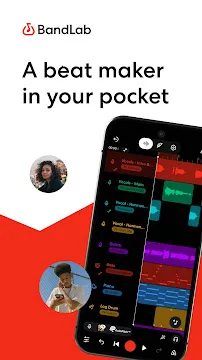
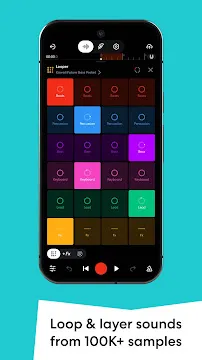
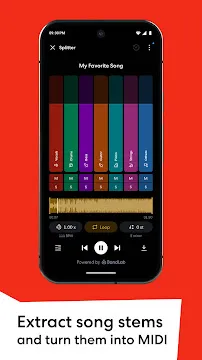
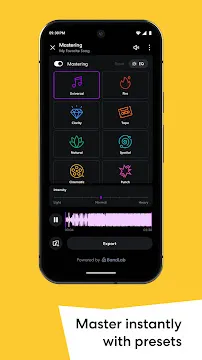
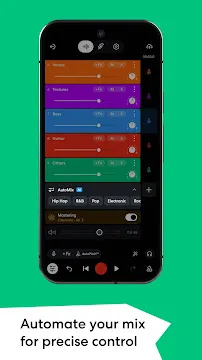
BandLab changes how musicians create music on their mobile devices. Therefore, you can record songs anywhere at any time. This music creation tool costs nothing to download. Furthermore, it provides a complete studio experience in your pocket. Many creators use BandLab to build beats and write lyrics. Because the design is simple, beginners can learn the controls quickly. Consequently, you do not need expensive gear to start your musical journey. You only need your phone and your creativity. Today, millions of artists share their work on this global platform. You can join them and express your artistic vision freely.
What is BandLab and How Does It Work?
BandLab operates as a cloud-based music production platform. Therefore, your projects automatically save to the internet. You can start a song on your phone and finish it on your computer later. This seamless workflow helps artists work without losing any important data. Moreover, you can access your music catalog from any device with internet access.
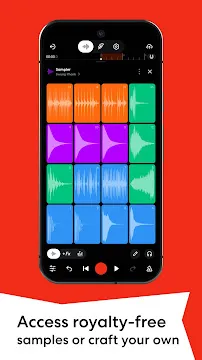
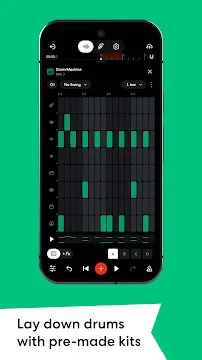
First, you open the mix editor to start a new project. The editor allows you to upload audio files or record live instruments. In addition, you can use virtual instruments like drums and pianos. BandLab provides thousands of free loops and samples for your tracks. These sounds cover many different musical genres.
As a result, you can layer different sounds to create unique beats. You control the volume and effects of each separate track. However, you do not need a background in audio engineering to understand these features. The clear layout guides you through every step of the creative process. Therefore, you can focus entirely on making your music sound great.
Key Features of the Mobile Studio
The multi-track mix editor forms the core of the music making experience. Specifically, it allows you to record up to sixteen tracks of audio. This means you can add vocals, guitars, and synthesizers to one project. Consequently, your songs can sound rich and detailed.
- BandLab provides a built-in tuner for guitars and basses.
- You can access a massive library of royalty-free loops.
- The tool includes advanced audio effects like reverb and distortion.
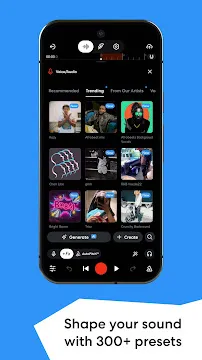
- A vocal processor helps you correct your singing voice automatically.
Furthermore, the platform includes an automated mastering tool. This feature polishes your final mix with intelligent algorithms. Therefore, your tracks sound ready for streaming platforms immediately. Many independent artists use this specific tool to save money on professional mastering services. Additionally, you can customize the mastering style to fit your specific genre.
Why Musicians Love BandLab
BandLab eliminates the financial barriers to high-quality music production. Traditionally, recording music required expensive software and commercial studios. However, BandLab offers all its recording features for free. You do not encounter hidden paywalls or sudden subscription pop-ups while creating. This open approach allows everyone to make music without stress.
In addition, the platform offers a supportive community of global creators. You can share your finished tracks directly to the public feed. Consequently, other musicians can listen to your work and offer feedback. You might even find new fans from different countries. This social aspect encourages continuous growth and learning.
Moreover, collaboration happens naturally on this network. You can invite other artists to edit your song files remotely. One artist can record the drums in London while you sing the lyrics in New York. Because of this connectivity, global bands can form effortlessly online. Therefore, distance no longer limits your musical opportunities.
How to Start Your First Track
First, you must download BandLab from your device’s official app store. After you open the tool, create a free user profile. Then, tap the large plus icon at the bottom of the screen. This action opens the menu for new projects. You will see several options for creating music.
Next, choose your input method from the available options. If you want to sing, select the voice microphone option. Alternatively, select the looper tool if you want to build an electronic beat quickly. You can explore the various genre packs to find your favorite sounds. These packs include pre-made beats and loops.
Finally, press the red record button to start tracking your performance. Use headphones while recording to prevent your phone speaker from bleeding into the microphone. Once you finish recording, save your work to the cloud. You can return to edit the track whenever inspiration strikes. Furthermore, you can share the draft with friends for early feedback.
Connecting with Creators Through BandLab
BandLab acts as a social network for modern music makers. For example, you can follow your favorite producers and singers on the platform. You see their updates on your personalized home feed every day. This layout keeps you inspired by showing what others create. You can also leave comments and likes on their tracks.
Furthermore, you can use the unique Fork feature on specific tracks. When an artist makes a track forkable, you can download their project files. Then, you can add your own remix or vocals to their original beat. As a result, you create a unique collaboration with artists you admire. This feature helps you build connections with other creators worldwide.
Besides remixing, you can join public creator groups. These groups focus on specific genres like hip-hop, rock, or electronic music. Members frequently share tips and listen to each other’s unreleased songs. Therefore, you can grow your skills by learning from experienced community members.
Tips for Better Mobile Mixing
Mixing on a smartphone requires patience and a few good habits. First, always use high-quality headphones during the mixing process. Phone speakers cannot reproduce deep bass frequencies accurately. Therefore, headphones give you a true representation of your final sound.
Second, keep your individual track volumes below the clipping point. If the volume meters turn red, your audio will distort unpleasantly. Instead, lower the volume sliders to keep the sound clean. You can always raise the master volume later during the mastering phase.
- Listen to your mix at low volume levels to check the balance.
- Apply equalizers to remove muddy frequencies from your vocals.
- Use spatial effects like panning to separate your instruments left and right.
- Compare your track to professional songs to spot any major differences.
Lastly, take frequent breaks to rest your ears. Ear fatigue can cause you to make poor mixing choices. When you return with fresh ears, you will notice mistakes easily. Consequently, your final mix will sound much cleaner and more balanced.
Conclusion
BandLab transforms your mobile device into a complete recording studio. Because it costs nothing, any aspiring musician can start creating songs today. The combination of multi-track recording and social networking makes it highly effective. Whether you write lyrics or produce heavy beats, you find useful tools here. Furthermore, the supportive community helps you grow as an artist. Start your musical project today and share your unique voice with the entire world.